

ChatGPT for Productivity: 15 Prompts for Busy Leaders

Key Takeaways
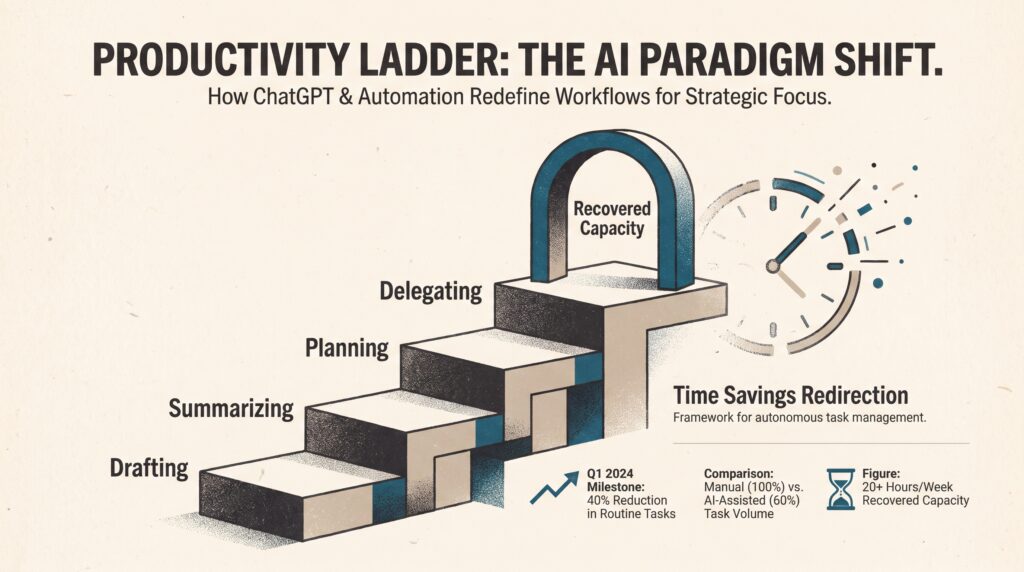
- ChatGPT for productivity works best on bounded tasks: drafting, summarizing, planning, meeting follow-up, and research synthesis.
- In controlled experiments, ChatGPT access reduced completion time and raised output quality [1]. Population data suggests users save roughly 5–6% of work hours [3].
- Saved time does not stay saved unless you decide in advance where it goes.
- Delegate only tasks inside AI’s capability frontier. On tasks outside it, performance can decline [5].
- Measure verification time, protect recovered minutes, and end each week with a deliberate shutdown.
The goal is not to fill every recovered minute. It is to turn AI-assisted efficiency into better decisions, deeper focus, real recovery, and leadership you can sustain.
Introduction: Why ChatGPT Productivity Needs a Burnout Safeguard
ChatGPT can save leaders meaningful time, but only if they decide in advance where that time goes. A 2024 St. Louis Fed paper estimates that workplace uptake after ChatGPT’s late-2022 release was as fast as computer adoption after the 1984 IBM PC release [4]. Yet US leaders are not working less. Many are working faster, on more things, and are just as exhausted.
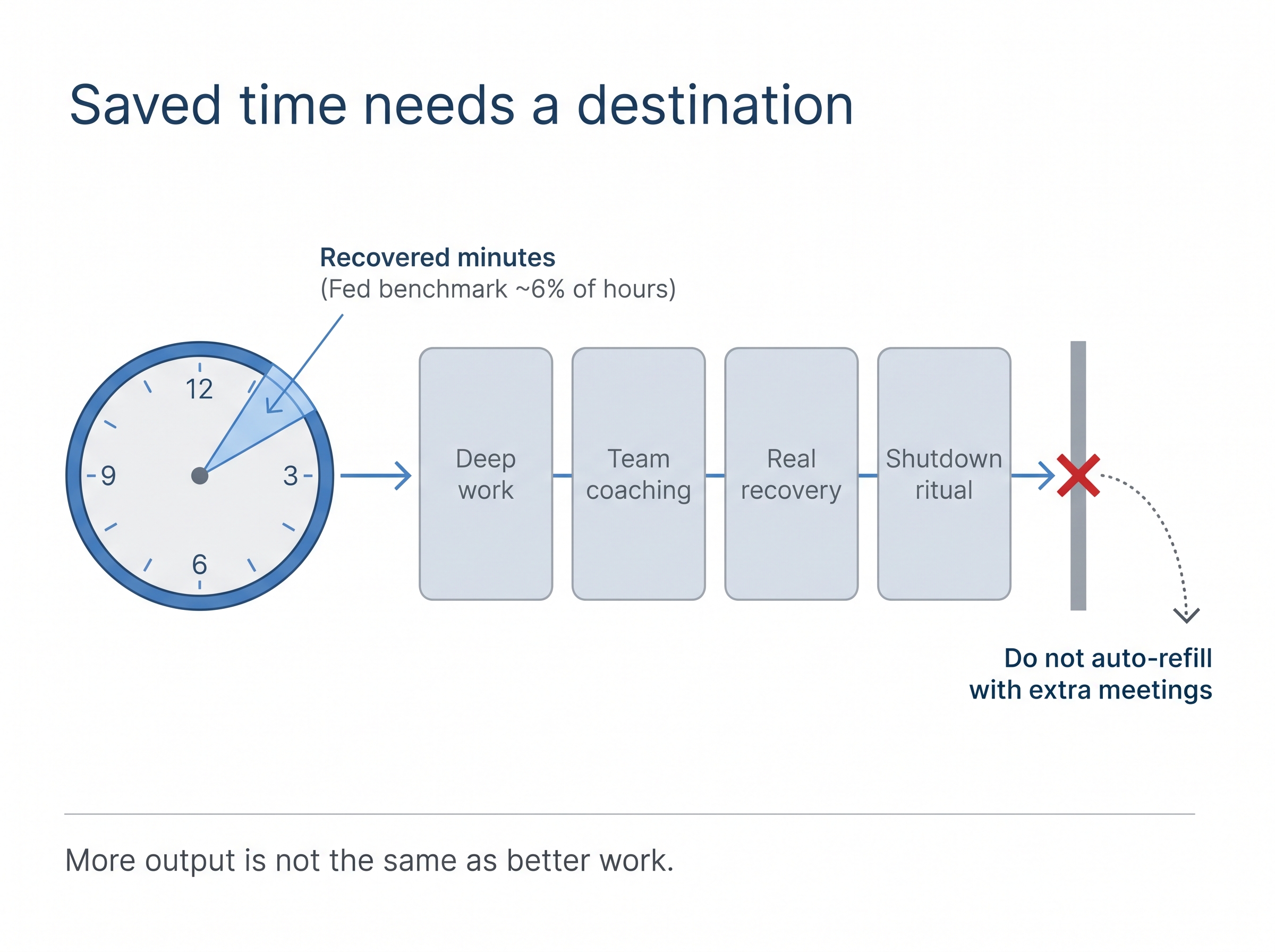
More output is not the same as better work. ChatGPT is most useful when it removes repetitive cognitive load while preserving human judgment and personal time. Results also vary widely. Workers at the 95th percentile of AI adoption send roughly six times as many messages as the median employee [2]. Your gains depend on task type, workflow maturity, input quality, and how carefully you verify outputs.
This guide answers four questions:
- How much time can ChatGPT realistically save?
- How do users progress from basic drafting to workflow delegation?
- Which tasks belong inside or outside AI’s capability frontier?
- How can managers turn saved hours into sustainable productivity instead of a bigger workload?
How ChatGPT for Productivity Saves Time, and Why Leaders Must Redirect It
ChatGPT saves measurable time on well-defined tasks. That time rarely stays saved unless a leader assigns it a purpose. Generic advice skips organizational reality: recovered minutes turn into extra meetings, faster expectations, and larger workloads.
What the evidence shows
Controlled experiments. In an experiment with 444 college-educated professionals, ChatGPT access cut completion time on writing tasks by 0.83 standard deviations and raised output quality by 0.45 standard deviations [1]. Gains were often largest among workers with lower baseline performance. However, the tasks were bounded and did not replicate messy organizational work.
Population data. The St. Louis Fed’s November 2024 survey found that generative AI users saved about 5.4% of their work hours [3]. More recent Fed estimates put the figure at roughly 6.0% for users, compared with about 2.08% across all workers. In a 40-hour week, 6% is about 2.4 hours. Treat these figures as benchmarks, not promises.
The well-being caveat. A 2026 study of AI learning and workforce well-being links the pressure to keep up with tools like ChatGPT to psychological contract breach and burnout. Self-efficacy shapes how strongly that pressure lands [7]. Efficiency without boundaries can make things worse.
In her book Workaholic’s Detox, Dr. Kara Larson examines the patterns that keep high performers trapped in overwork. The same principle applies to AI: efficiency improves your life only when you decide what the recovered time is for. If that pattern sounds familiar, the free first chapters are a good place to start.
The Time Savings Redirection framework
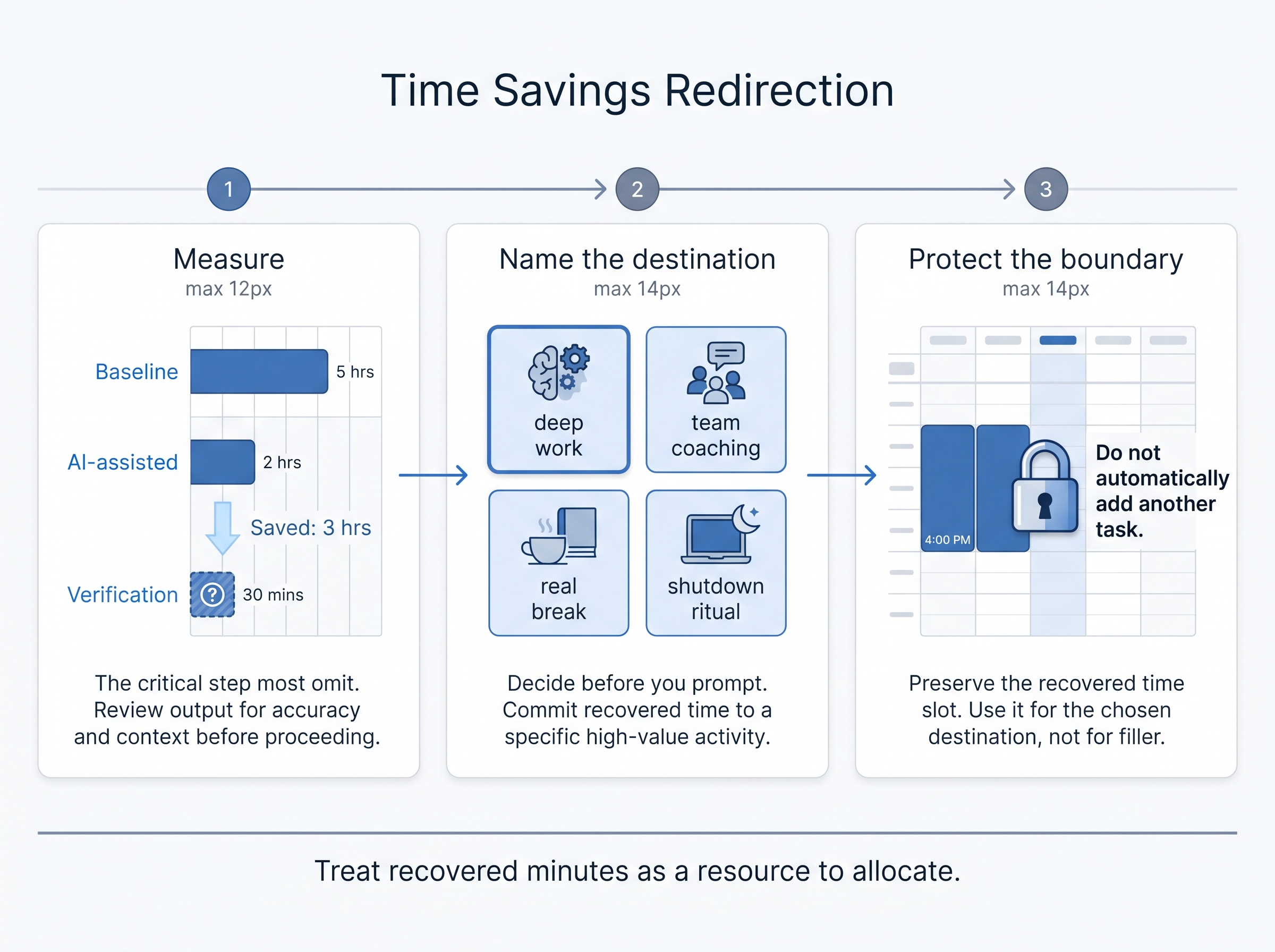
- Measure. For each task, log the baseline time, the AI-assisted time, and the verification time. Verification is the number most people forget, and it determines your real savings.
- Name the destination. Before you prompt, decide where recovered minutes go: deep work, team coaching, a real break, or a shutdown ritual.
- Protect the boundary. When a task finishes early, do not automatically add another one.
A practical example
Say ChatGPT handles the structure, first draft, and gap-spotting for your weekly leadership update. Log your time before and after, including review. Then give the difference a destination, such as clearing pending decisions plus a short screen-free transition before your next meeting. Treat saved time as a resource to allocate, not as empty capacity for the organization to refill.
The Four-Stage ChatGPT Productivity Ladder: From Drafting to Delegating
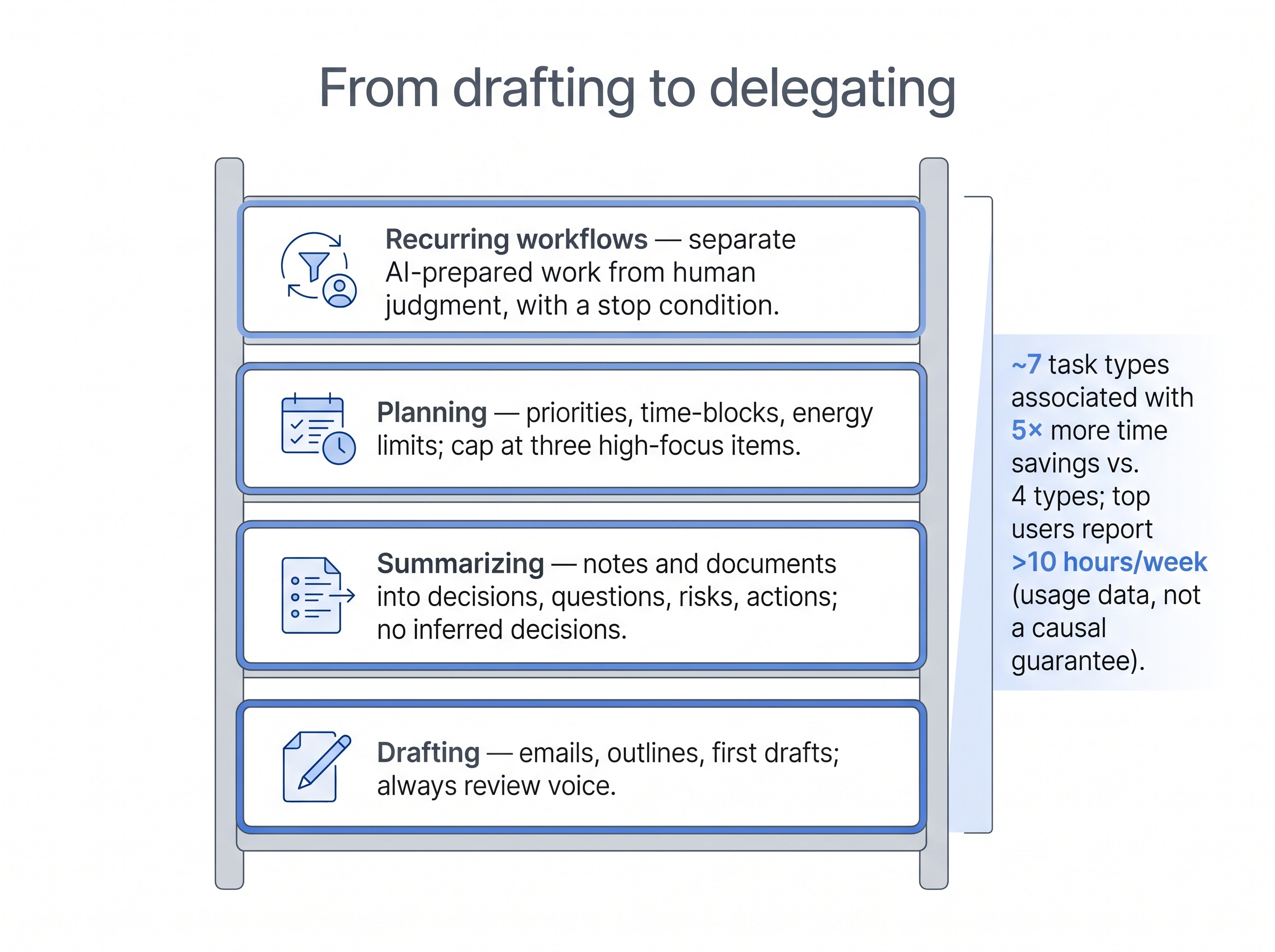
Power users get more from ChatGPT through breadth. They use it for more types of tasks and in more structured ways.
- VentureBeat’s reporting on OpenAI’s enterprise data shows that 95th-percentile workers send about six times as many messages as median employees [2].
- OpenAI’s analysis finds that time saved correlates with use of advanced features such as Deep Research and reasoning models. Top users report saving more than 10 hours per week [8].
- Workers who apply AI to around seven task types report five times more time savings than those who use it for four [9].
These figures come from aggregated product-usage data, so they show correlation rather than a causal guarantee. Breadth goes along with savings, but you still have to build each stage deliberately. Reddit productivity threads often describe the same gap: users cannot see how to move past basic drafting. The ladder below is that path.
Stage 1: Drafting
Best for emails, outlines, status updates, and first drafts.
“Draft a concise update for [audience] using the facts below. Preserve my direct but respectful tone. Flag any statement that requires verification.”
Always review the draft for voice. ChatGPT does not know your relationship history.
Stage 2: Summarizing and retrieving
Best for meeting notes, research, and long documents.
“Summarize these notes into decisions, open questions, risks, and action items. Do not infer a decision that is not explicitly stated.”
Use company-approved tools, and remove confidential details first.
Stage 3: Planning
Best for weekly priorities, time-blocking, and sequencing.
“Here are my priorities, deadlines, available work blocks, and energy constraints. Create a realistic plan with no more than three high-focus priorities. Identify what should be deferred.”
“Here is my task list. Re-rank it by impact, give a one-line reason for each rank, and mark which three must happen before noon.”
The second prompt follows the structure of prioritization prompts in practitioner collections [6]. Both prompts plan for sustainable capacity rather than maximum utilization.
Stage 4: Delegating through recurring workflows
Best for weekly reports, onboarding materials, and repeated analysis.
“Using the project context and operating principles below, create a repeatable weekly workflow. Separate tasks ChatGPT may prepare from decisions that require my judgment.”
“Draft the standard structure for my Monday report so next week I only supply the new inputs.”
Delegation requires quality checks, clear ownership, data permissions, and a stop condition. At this stage, deciding what should stay human-led becomes the central question.
The Jagged Frontier: What Leaders Should and Should Not Delegate to ChatGPT
Leaders should delegate tasks that fall within ChatGPT’s demonstrated capability and keep high-stakes judgment human-led. The boundary is uneven. ChatGPT can excel at one task and fail at another that looks intellectually similar. Researchers call this the “jagged frontier” [5].
Evidence from the Harvard/BCG field experiment
The strongest evidence comes from a Harvard Business School field experiment with Boston Consulting Group. It involved 758 consultants working on 18 business tasks, some with GPT-4 and some without [5].
According to the study’s 2026 published version, consultants using AI on tasks inside the capability frontier completed about 12.2% more tasks, worked roughly 25.1% faster, and received human quality ratings roughly 32% higher. On tasks outside the model’s range, performance declined. AI made people worse when they trusted it beyond its competence. Most productivity guides leave this finding out.
Inside/Outside the Frontier decision table
| Task type | Likely position | ChatGPT’s role | Required human control |
|---|---|---|---|
| First-draft email or memo | Inside | Draft and revise | Tone, facts, relationship context |
| Meeting-note organization | Inside, with review | Extract decisions and action items | Confirm ownership and commitments |
| Research synthesis | Mixed | Compare supplied information | Verify sources and conclusions |
| Legal, financial, or HR judgment | Outside or high-risk | Generate questions or checklists only | Qualified human review |
| Sensitive employee conversation | Outside | Help prepare language and scenarios | Manager owns empathy and judgment |
| Novel strategic decision with incomplete data | Mixed or outside | Surface options and assumptions | Leader makes and documents the decision |
For the “mixed” rows, use ChatGPT to stress-test your thinking rather than to decide:
“List the assumptions behind this recommendation and what evidence would challenge each one.”
“Run a pre-mortem: assume this plan failed in six months. Explain the most likely causes.”
The four-question delegation test

Before assigning any task, ask:
- Is the task bounded and clearly defined?
- Can a human verify the output efficiently?
- Is the context accurate and safe to share?
- What happens if the answer is wrong?
If the cost of an error is high or verification is hard, ChatGPT helps you prepare, but it does not make the call. Practitioners in Reddit’s productivity community describe the same pattern. They find it useful for drafts and retrieval but limited beyond that.
A Manager’s Week with ChatGPT: Real Context, Review, and Shutdown
Managers get the most from ChatGPT when they give it real context. The most valuable inputs are 1:1 notes, project updates, survey themes, role expectations, deadlines, and team constraints. Good context matters more than clever wording. Breadth matters too: users who apply AI across about seven task types save five times more time than those using four [9]. The weekly rhythm below covers several task types without adding new work.
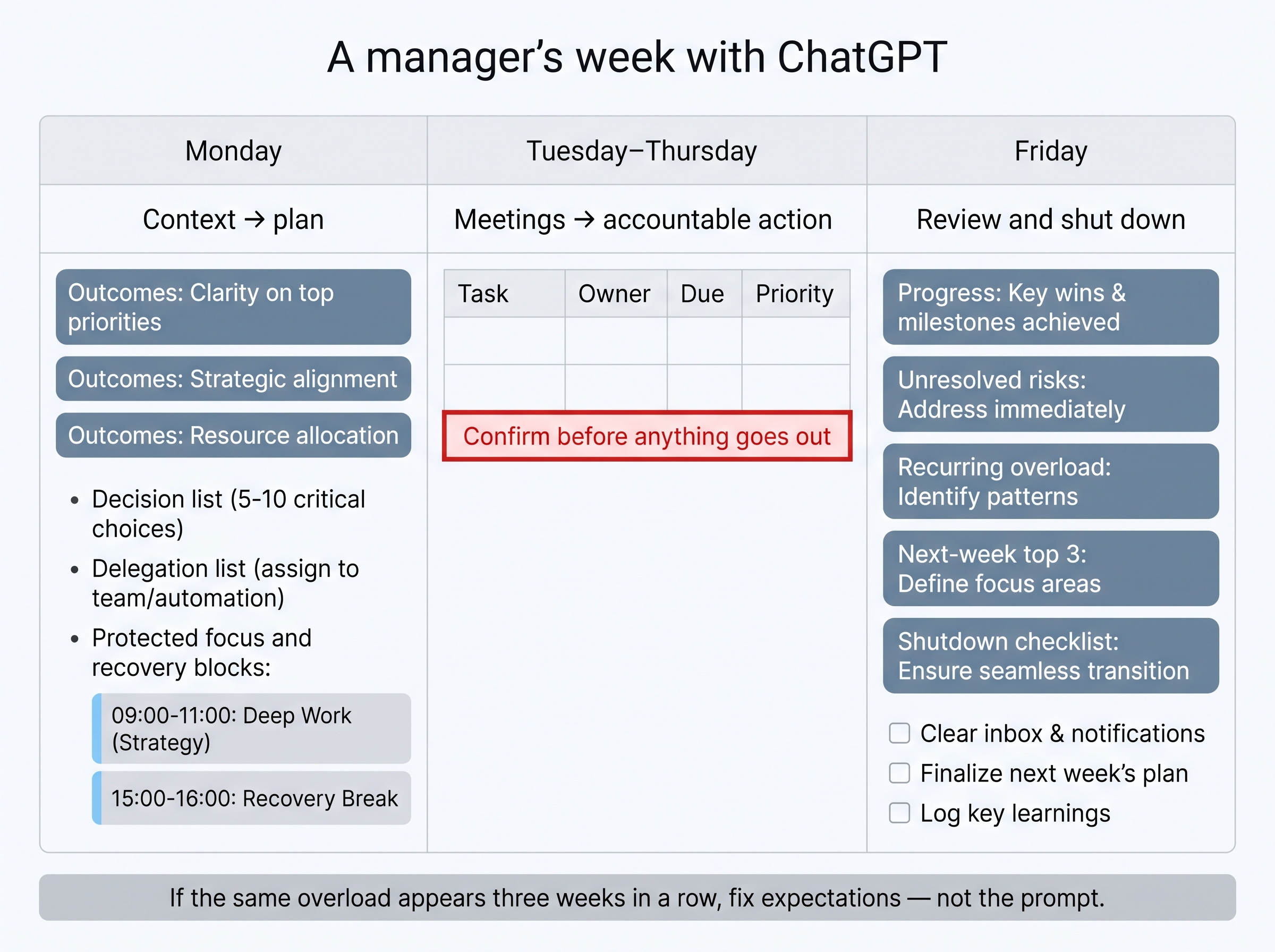
Monday: convert context into priorities
“Using these project updates, team commitments, deadlines, and personal capacity limits, create a weekly leadership plan. Separate urgent work from important work. Identify decisions I must make, conversations I must have, and tasks that can be delegated.”
Ask for three weekly outcomes, a decision list, a delegation list, risks and dependencies, and protected blocks for focus and recovery.
Tuesday through Thursday: turn meetings into accountable action
“From these meeting notes, extract every action item into a table with Task, Owner, Due Date, and Priority. If no due date was stated, write TBD. Separate confirmed decisions from unresolved questions.”
| Task | Owner | Due date | Priority | Verification needed |
|---|---|---|---|---|
| (example) Confirm vendor timeline | Dana | TBD | High | Dana to accept date |
Confirm ownership and due dates before anything goes out. ChatGPT can draft the follow-up, but no follow-up should go out without your review. Practitioner discussions show strong demand for this kind of drafting and templating support.
Friday: review and shut down
“Review this week’s completed, deferred, and unexpected work. Identify progress, unresolved risks, recurring sources of overload, and the three most important priorities for next week. Create a shutdown checklist that prevents unfinished work from following me into the evening.”
Use the “recurring sources of overload” output as a signal. If the same overload appears three weeks in a row, the fix is a conversation about expectations, not a better prompt. ChatGPT can keep the list, but you still have to set the limits.
Limitations, alternatives, and professional guidance
ChatGPT cannot replace company policy, professional advice, secure data handling, or manager judgment. Keep these safeguards in place:
- Use approved business accounts. Never enter confidential employee, customer, health, legal, or financial information unless your organization’s controls permit it.
- Verify before acting. ChatGPT can state incorrect information confidently, so check facts, figures, and commitments.
- Watch for workload creep. If chronic overwork is the core problem, automation may deepen it by raising capacity without changing expectations.
This article is for general informational purposes and is not medical, legal, or financial advice. If you have persistent burnout, anxiety, or health symptoms, seek support from a qualified medical or mental-health professional. Non-AI habits such as shutdown rituals, brain breaks, and guided breathing are the focus of Dr. Larson’s Productivity in Your Pocket course, which teaches daily routines rather than AI tools.
Frequently Asked Questions
How can ChatGPT be used for productivity?
Use it for bounded tasks such as drafting, summarizing, planning, research synthesis, meeting follow-up, and prioritization. Give it accurate context and verify the output. In experiments, ChatGPT access produced 0.83 SD faster completion and 0.45 SD higher quality [1]. You keep the judgment and the final decisions.
What are the best ChatGPT prompts for daily planning?
Include your priorities, deadlines, work blocks, energy limits, and non-negotiables. Ask for three outcomes, a split between urgent and important work, dependencies, items to defer, and a clear shutdown point.
How much time can ChatGPT save at work?
St. Louis Fed estimates put user savings at roughly 6% of work hours, or about 2.4 hours in a 40-hour week [3]. Some advanced users report saving more than 10 hours a week [8]. Include verification time when you calculate your own baseline.
Can ChatGPT help with email and meeting notes?
Yes. It can produce drafts, summaries, and action-item tables. Make sure it does not invent commitments, never send sensitive messages without reviewing them, and use approved tools for confidential material.
What tasks should leaders not delegate to ChatGPT?
Do not delegate high-stakes judgment, sensitive people decisions, or legal and financial conclusions. In the Harvard/BCG experiment, performance declined on tasks outside AI’s capability frontier [5]. Use ChatGPT to prepare, and make the final call yourself.
Will using ChatGPT make me work more hours?
It can. Without boundaries, saved time often turns into extra tasks, and pressure to keep up with AI tools has been linked to burnout [7]. Before you start, decide where recovered time goes.
Conclusion: Use ChatGPT to Recover Capacity, Not Create More Work
ChatGPT for productivity is most valuable when it reduces repetitive work and protects human attention. Start this week:
- Measure saved time on three recurring tasks, including verification.
- Climb the ladder from drafting to structured delegation, one stage at a time.
- Apply the four-question frontier test before handing any work over.
- Close each week with a review and a shutdown checklist.
The goal is not perpetual acceleration. Microsoft’s Work Trend Index draws on Microsoft 365 signals, a survey of 20,000 workers across 10 countries, and organizational psychology experts [10]. Its findings suggest that the human side of AI adoption deserves as much attention as the technology. For habits that make efficiency last, see Dr. Larson’s Leadership Accountability and Emotional Excellence courses.
About the Author
Dr. Kara Larson, author of Workaholic’s Detox, writes about AI automation, productivity, and work-life balance for US business owners, managers, and corporate leaders.
Transparency Statement
This article draws on academic research, institutional data, industry reporting, practitioner resources, and community discussions. OpenAI usage figures are reported findings, not guarantees. Community sources are qualitative and are not representative research.
References
[1] Does Generative AI Narrow Education-Based Productivity
[3] The State of Generative AI Adoption in 2025
[4] Speech by Governor Barr on artificial intelligence and the labor market – Federal Reserve Board
[6] Best ChatGPT Prompts for Work: 50 Tested Examples (2026)
[7] The Nexus Between Artificial Intelligence and Workforce
[8] The State of Enterprise AI | OpenAI
[9] OpenAI claims generative AI saves knowledge workers 40 to 80 minutes a day
[10] 2026 Work Trend Index report: Agents, human agency, and opportunity
Responses